

Description
Lead Ledger helps local service businesses see every lead their website generates — form submissions and click-to-call events — in one simple dashboard.
All lead data stays on your WordPress site. No external CRM or third-party tracking service is required.
Built for these industries
Lead Ledger is designed for businesses that live on phone calls and contact forms:
- Home services — HVAC, plumbing, roofing, electrical, landscaping, cleaning, and general contractors
- Professional services — dental practices, law firms, accounting firms, and other appointment-based local businesses
- Any local business — if your site uses contact forms or click-to-call links, Lead Ledger fits
During setup, choose your business type (HVAC, plumbing, roofing, electrical, dental, legal, or other local service) so the wizard can tailor defaults. More industry presets may be added over time.
How it works
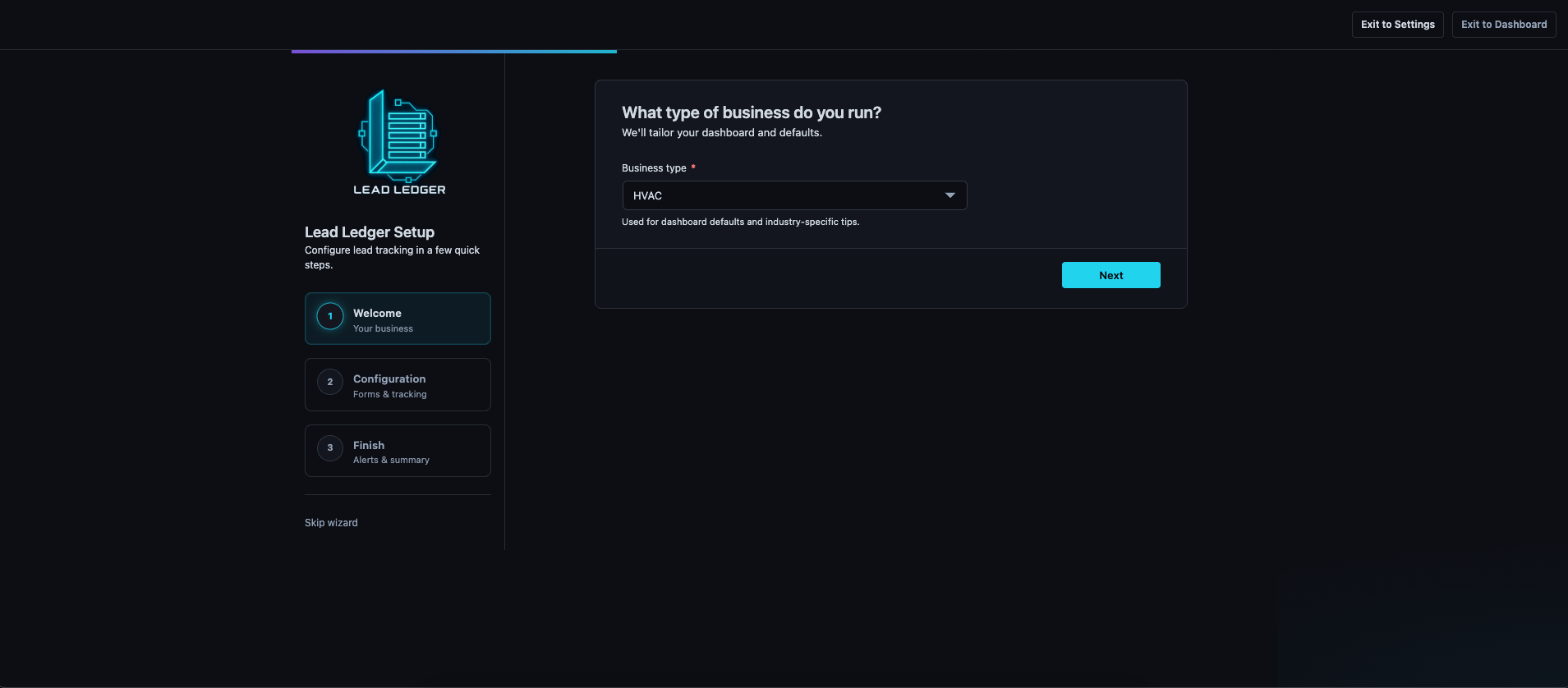
- Install and activate — After activation, Lead Ledger opens a 3-step setup wizard.
- Choose your business type — HVAC, plumbing, roofing, electrical, dental, legal, or other local service categories tailor dashboard defaults.
- Connect your forms — Select which Contact Form 7, WPForms, Fluent Forms, Ninja Forms, Gravity Forms, or Elementor Pro forms to track, or use the built-in
[ltll_form]shortcode on any page. - Confirm privacy settings — Acknowledge that lead and click tracking will be disclosed in your site privacy policy. Optional page view counts stay off unless you enable them.
- Set up alerts — Add a notification email for instant alerts. Optionally enable a Monday morning weekly digest.
- Track leads automatically — When a visitor submits a connected form or clicks any
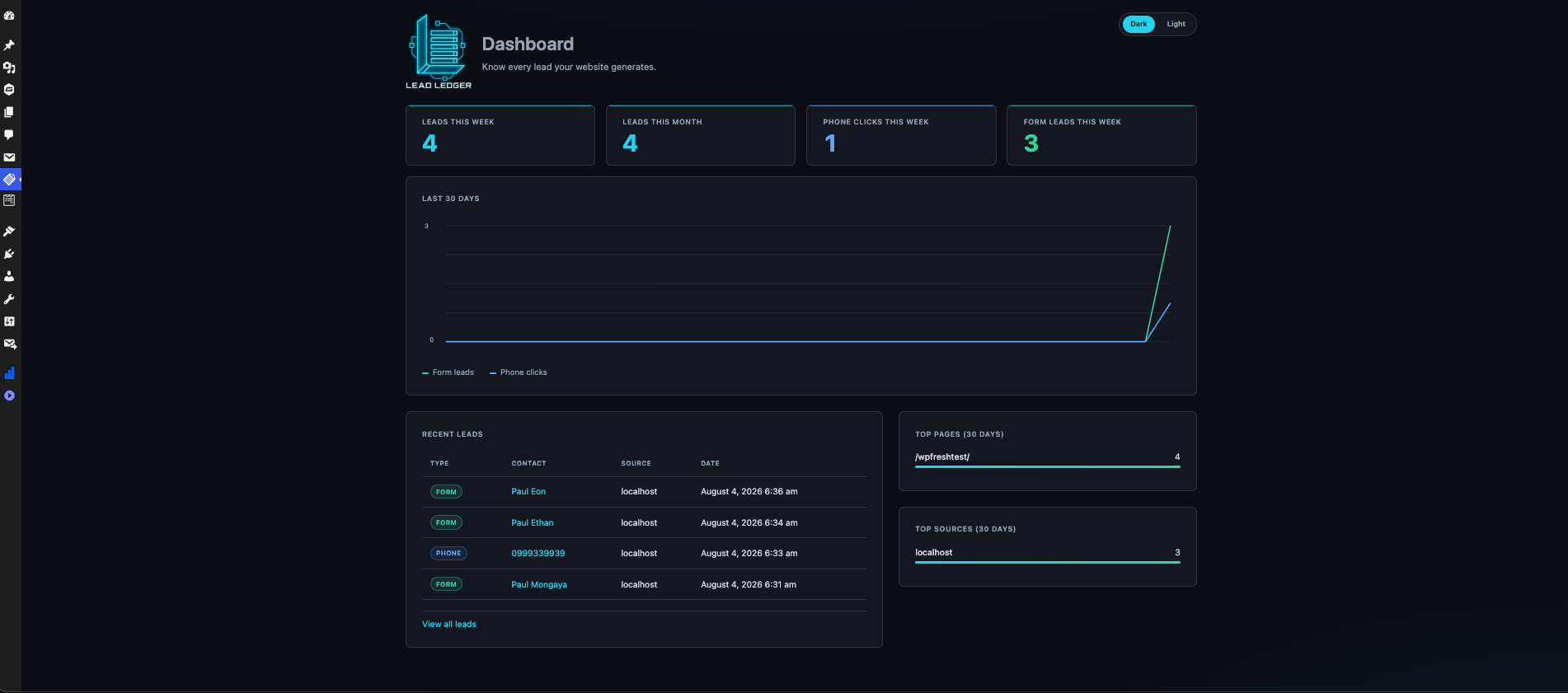
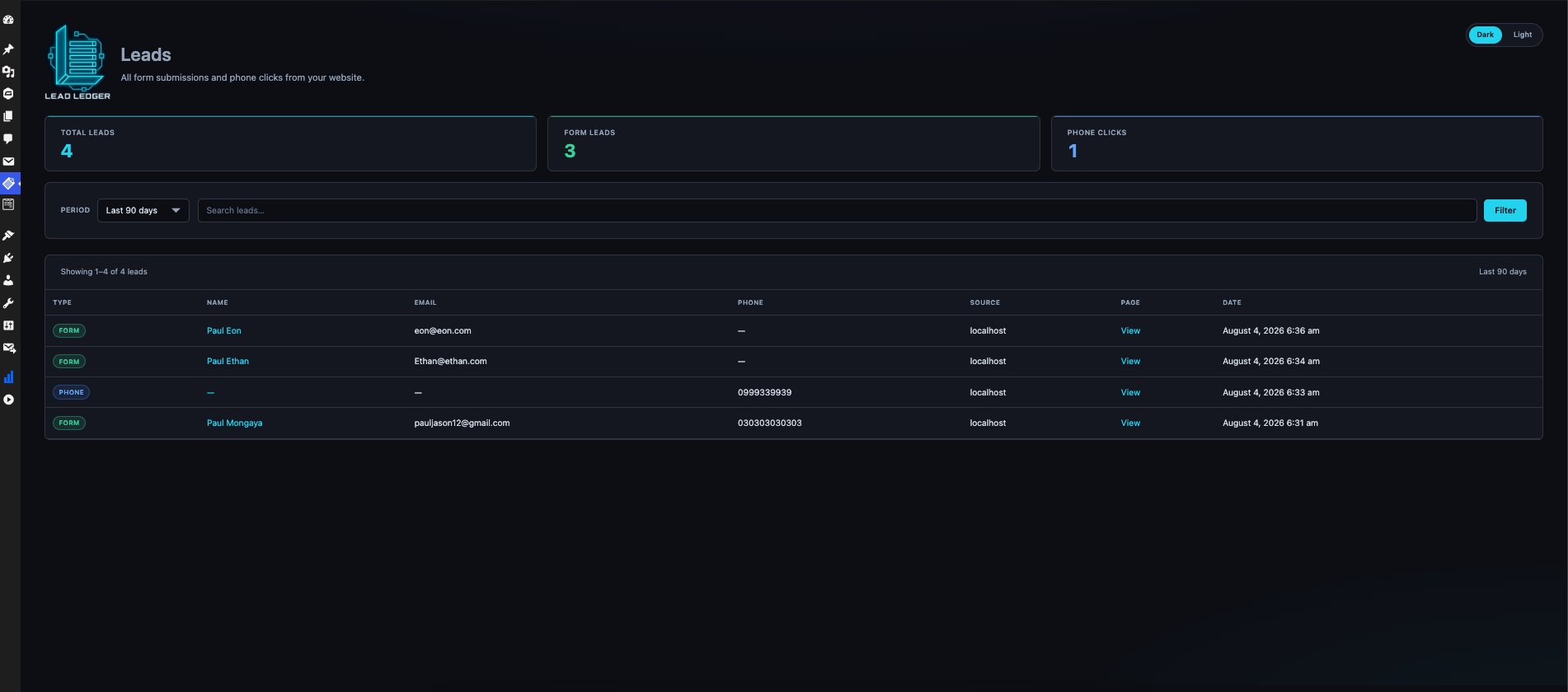
tel:link, Lead Ledger saves the lead with page URL, referrer, device type, and timestamp. - Review and act — Use the Dashboard for weekly stats and trends, or open Leads to search, filter, export individual leads as JSON, or delete records.
Phone click tracking runs site-wide via a lightweight front-end script. Form tracking hooks into Contact Form 7, WPForms, Fluent Forms, Ninja Forms, Gravity Forms, and Elementor Pro on submit. The native shortcode submits through the WordPress REST API with honeypot, timing, and rate-limit checks.
Features
- Track Contact Form 7, WPForms, Fluent Forms, Ninja Forms, Gravity Forms, Elementor Pro, and a native shortcode form
- Native form shortcode with theme-adaptive styling and built-in spam protection (honeypot, timing check, rate limit)
- Click-to-call (
tel:) tracking on any page - Dashboard with weekly/monthly stats, 30-day chart, top pages and sources
- Leads list with search, date filters, and a themed lead detail view
- Email instant alerts (when an address is configured) and optional weekly digest (opt-in)
- 3-step setup wizard for quick setup
- Dark / light theme toggle on admin screens
- 90-day lead history with per-lead JSON export and delete in the admin
- Optional CF7/WPForms field mapping when auto-detection needs help
Page view collection is off by default and requires an explicit admin opt-in.
Native form shortcodes
[ltll_form][ltll_form theme="dark"][ltll_form theme="light"][ltll_form type="estimate"]
Lead Ledger Pro
The free plugin includes everything you need to start tracking leads. Lead Ledger Pro adds SMS alerts, unlimited retention, CSV export, source breakdowns, and team workflow tools. See the site for details.
Privacy Policy
Lead Ledger stores lead data locally in your WordPress database.
Data collected (when a visitor submits a form or clicks a phone link):
* Name, email, phone number, message (if provided)
* Referrer URL / source domain
* Page URL where the event occurred
* Device type (mobile/desktop)
* Timestamp
Data collected (admin opt-in only, default off):
* Anonymous daily page view counts per URL (no personal data)
Retention:
* 90 days, then auto-deleted (free plan)
Third parties:
* No lead data sent to external services
Privacy tools:
* Setup wizard requires privacy policy acknowledgment before finishing
* Optional privacy policy URL for the native form consent link
* Export or delete individual leads from the Lead Ledger admin (not via WordPress Tools Export/Erase Personal Data)
Screenshots

Installation
- Upload the plugin files to
/wp-content/plugins/locallift-leadledger, or install through the WordPress plugins screen. - Activate the plugin through the Plugins screen in WordPress.
- Complete the Lead Ledger Setup wizard (opens automatically on first visit):
- Step 1 — Welcome: Choose your business type.
- Step 2 — Configuration: Connect supported form plugins, acknowledge privacy requirements, and optionally enable page view counts.
- Step 3 — Finish: Set your notification email, send a test alert, and optionally enable the weekly digest.
- Submit a test form on your site, then open Lead Ledger Dashboard to confirm the lead appears.
- (Optional) Place
[ltll_form]on a page if you want the built-in contact form instead of CF7 or WPForms.
You can revisit Lead Ledger Settings anytime to change connected forms, notifications, field mapping, or privacy options.
Video walkthrough:
FAQ
-
How do I get started after installing?
-
Activate the plugin and follow the setup wizard. Connect at least one form (or add
[ltll_form]to a page), set a notification email, and submit a test lead. Your first real lead will appear on the Dashboard within seconds. See the setup video in the Installation section above. -
What industries is Lead Ledger built for?
-
Home services (HVAC, plumbing, roofing, electrical), professional services (dental, legal, accounting), and any local business that relies on website forms and phone calls. Select your industry during the setup wizard — or choose Other Local Service if yours is not listed yet.
-
Does this work with Contact Form 7?
-
Yes. Connect any CF7 forms you want to track during setup or in Settings Forms. If field names are non-standard, use Settings Field mapping to map name, email, phone, and message fields.
-
Does this work with WPForms?
-
Yes. Connect any WPForms you want to track. WPForms fields are detected by field type automatically; mapping overrides are optional.
-
Does this work with Fluent Forms?
-
Yes. Connect Fluent Forms during setup or in Settings Connected forms. Name, email, phone, and message fields are auto-detected from the form definition.
-
Does this work with Ninja Forms?
-
Yes. Connect Ninja Forms during setup or in Settings Connected forms. Standard field types are auto-detected.
-
Does this work with Gravity Forms?
-
Yes. Connect Gravity Forms during setup or in Settings Connected forms. Standard field types are auto-detected, with optional field ID mapping when needed.
-
Does this work with Elementor Pro Forms?
-
Yes. Lead Ledger discovers Elementor form widgets across your site. Match submissions using the custom Form ID in the widget’s Additional Options when possible.
-
Does this track phone clicks?
-
Yes. Any
tel:link on your site is tracked when clicked. No extra shortcode or configuration is needed beyond activating the plugin. -
Can I use Lead Ledger without a third-party form plugin?
-
Yes. Add the
[ltll_form]shortcode to any page or post. The form includes consent text, spam protection, and matches your page theme when possible. -
Is the weekly digest enabled by default?
-
No. You opt in during the setup wizard or in Settings. Instant email alerts use the address you configure during setup.
-
What privacy steps does the setup wizard require?
-
Step 2 includes an optional privacy policy URL and a required confirmation that you will disclose lead and click tracking in your site privacy policy. Page view collection remains off unless you explicitly enable it.
-
Is page view tracking enabled by default?
-
No. You must opt in from Settings or the setup wizard. When enabled, Lead Ledger stores anonymous daily page view counts per URL — no personal data. Disclose tracking in your site privacy policy.
-
Does this plugin connect to external services?
-
No. Lead data is stored locally in your WordPress database. Email alerts are sent through your site’s normal WordPress mail configuration.
-
How do I export or delete lead data?
-
Open a lead in Lead Ledger Leads and use Export JSON or Delete lead. Data is also auto-purged after 90 days on the free plan.
-
Is there a setup video?
-
Yes. See the Video walkthrough in the Installation section above.
Reviews
There are no reviews for this plugin.
Contributors & Developers
“Form & Phone Lead Tracker for Local Service Businesses – Lead Ledger” is open source software. The following people have contributed to this plugin.
Contributors
Translate “Form & Phone Lead Tracker for Local Service Businesses – Lead Ledger” into your language.
Interested in development?
Browse the code, check out the SVN repository, or subscribe to the development log by RSS.
Changelog
1.0.4
- Add Gravity Forms integration with connected-form selection and optional field ID mapping.
1.0.3
- Add Fluent Forms, Ninja Forms, and Elementor Pro Forms integrations.
- Connect supported forms in Settings and the setup wizard.
- Improve tracker attribution injection for Elementor and Ninja Forms.
1.0.2
- Add Pro upgrade teasers on Leads and Settings with upgrade modal.
- Update WordPress.org listing title and short description for search discoverability.
- Shorten wp-admin plugin name to Lead Ledger.
1.0.1
- Fix Settings and Leads admin styling on WordPress 7.x (CSS/JS now load correctly).
- Fix front-end tracker JavaScript error (
getPageUrl is not defined). - Improve setup wizard hook detection across WordPress admin hook naming changes.
1.0.0
- Initial release.
- Track CF7, WPForms, native form shortcode, and click-to-call.
- Dashboard, leads list/detail, settings, and setup wizard with dark/light themes.
- Instant email alerts, optional weekly digest, and 90-day retention with per-lead export/delete.