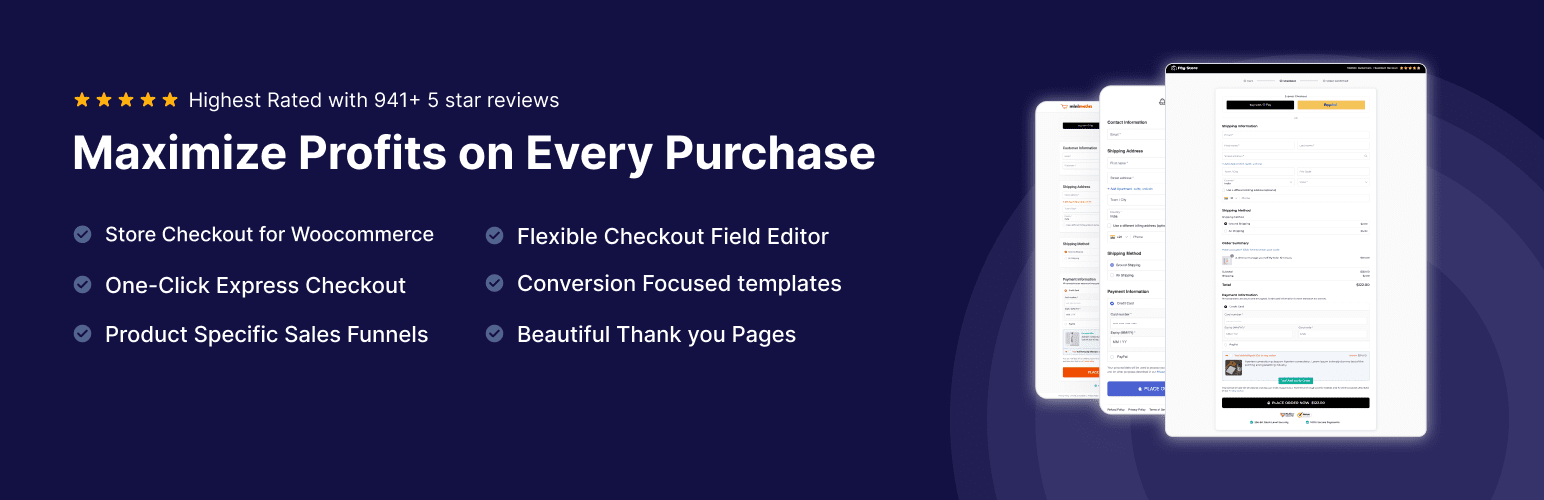

Description
WooCommerce Checkout Plugin & WordPress Funnel Builder
Tired of paying high monthly fees for rigid checkout plugins and funnel builders?
You don’t need to anymore.
Meet FunnelKit (formerly WooFunnels): the most intuitive and affordable Funnel Builder for WordPress. It makes the process of creating conversion-optimized WooCommerce checkouts, beautiful opt-in pages, landing pages, one-click upsells and even thank you pages a breeze.
FunnelKit Funnel Builder helps store owners by enhancing WooCommerce checkout conversions with pre-designed templates for every use case. You can create unlimited sales funnels to attract visitors and guide them toward becoming loyal customers.
FunnelKit provides you with pre-built templates that are 100% mobile-responsive and look great on all devices. You can find templates for designing custom WooCommerce checkouts, sales pages, lead generation pages, order bumps, one-click upsells, and thank you pages.
And you can even customize these templates with any of the popular page builders.
Use FunnelKit’s Funnel Builder to create:
- Optimized WooCommerce checkout pages, including one-page checkouts
- Multi-step checkouts (Pro)
- Beautiful sales/landing pages
- Highly targeted order bumps (Pro)
- Rule-based one-click upsell offers (Pro)
- Custom thank you or order confirmation pages
- Lead generation and opt-in confirmation pages
Get ready to attract more paying customers to your business!
The WooCommerce Checkout Plugin Built for Conversions
FunnelKit Funnel Builder is also a complete WooCommerce checkout plugin. The default WooCommerce checkout is a single rigid form, on a page you can’t design, with fields you can’t reorder and no way to offer anything extra before the customer pays. Every unnecessary field is another reason to abandon.
Customize your WooCommerce checkout page
Import a conversion-optimized checkout template and edit the whole page visually in Elementor, Divi, Bricks, Oxygen or Gutenberg. Every template includes trust seals, product guarantees and customer reviews. No code, and no editing your theme’s template files.
Edit your checkout fields by dragging them
Reorder and rearrange the existing checkout fields and sections, and reposition fields like email and phone that WooCommerce places poorly by default, so you capture them earlier in the form. Remove the fields you don’t need. Fewer fields means fewer abandoned checkouts.
Faster checkout for every shopper
Express pay buttons let mobile shoppers pay with Apple Pay or Google Pay without typing card details. Inline validation catches errors as the customer types, an enhanced international phone field reduces mistakes, and smart login speeds up returning customers.
Live cart capturing saves the shopper’s email the moment it’s typed, so abandoned checkouts can be followed up automatically.
Works with every native payment gateway
Stripe, PayPal, WooPayments, Authorize.net, Braintree, Square and Mollie all work on the FunnelKit checkout, so it fits the payment setup you already have.
Replace your checkout storewide and raise order value
With FunnelKit, you can override the default WooCommerce checkout across your entire store. Funnel Builder Pro lets you build one-page or multi-step layouts, add custom and conditional fields, and place rule-based order bumps on the checkout page with one-click upsells straight after it.
WHY DO YOU NEED A SALES FUNNEL?
A sales funnel takes users from downloading a lead magnet to buying your product or service. Not only that, it boosts your average order value through order bumps and one-click upsells.
Here are some major benefits of a sales funnel:
- Fewer Distractions: Users go from one step to the next without any exit points along the way.
- Higher Return on Ad Spend: Creating optimized user journeys allows you to maximize returns on ad spends.
- Greater Order Value: Show customers relevant pre- and post-purchase offers they can accept with one click.
- Higher Conversion Rates: With marketing automation added to your sales funnel, you can bring abandoned users back to complete their purchase.
Let’s explore the essential features of FunnelKit Funnel Builder.
FUNNEL BUILDER LITE FEATURES
Customized WooCommerce Checkout Page Storewide
Design beautiful, conversion-optimized WooCommerce checkout pages for your store. Every FunnelKit checkout template includes trust seals, product guarantees, customer reviews and more. Customize your WooCommerce checkout page for more conversions with these proven techniques.
Truly Flexible WooCommerce Checkout Field Editor
Take control of your WooCommerce checkout form. Edit, reorder and rearrange the existing checkout fields and sections by dragging them, and reposition fields like email and phone that WooCommerce places poorly by default, so you capture them earlier in the form. Remove the fields you don’t need.
Opt-in & Sales Pages
Send paid traffic to a dedicated landing page instead of your storefront. Build sales pages that make the case before the checkout, and squeeze pages that capture leads who aren’t ready to buy yet. Embed opt-in forms directly on the page, or open them in a lightbox (Pro).
Customizable WooCommerce Thank You Pages
The default thank you page looks bland and isn’t optimized to carry the conversation forward. With our highly customizable templates and widgets, you can create beautiful order confirmation pages.
High-Converting Templates for Every Step
Every template is thoughtfully built, imports with one click, and is optimized for mobile, tablet, and desktop.
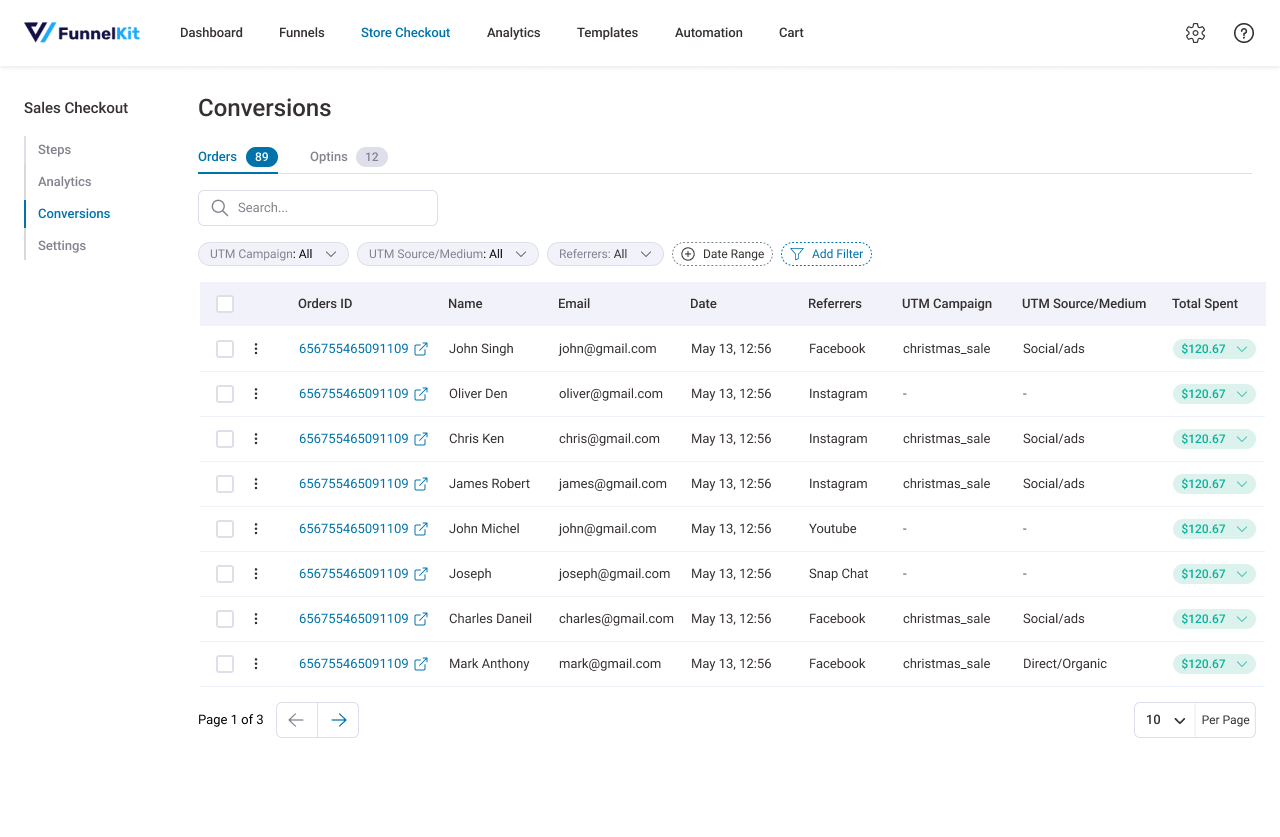
Contacts Activity
Get in-depth insight into every customer, including what they bought, which offers they accepted or rejected, total spend, spend at each step and more.
You can see the contacts entering your funnel and see detailed analytics in real time.
What’s more? You can choose to send the contacts over to your CRM or nurture them using FunnelKit Automations – one of the most popular marketing automation and broadcast CRM for WordPress.
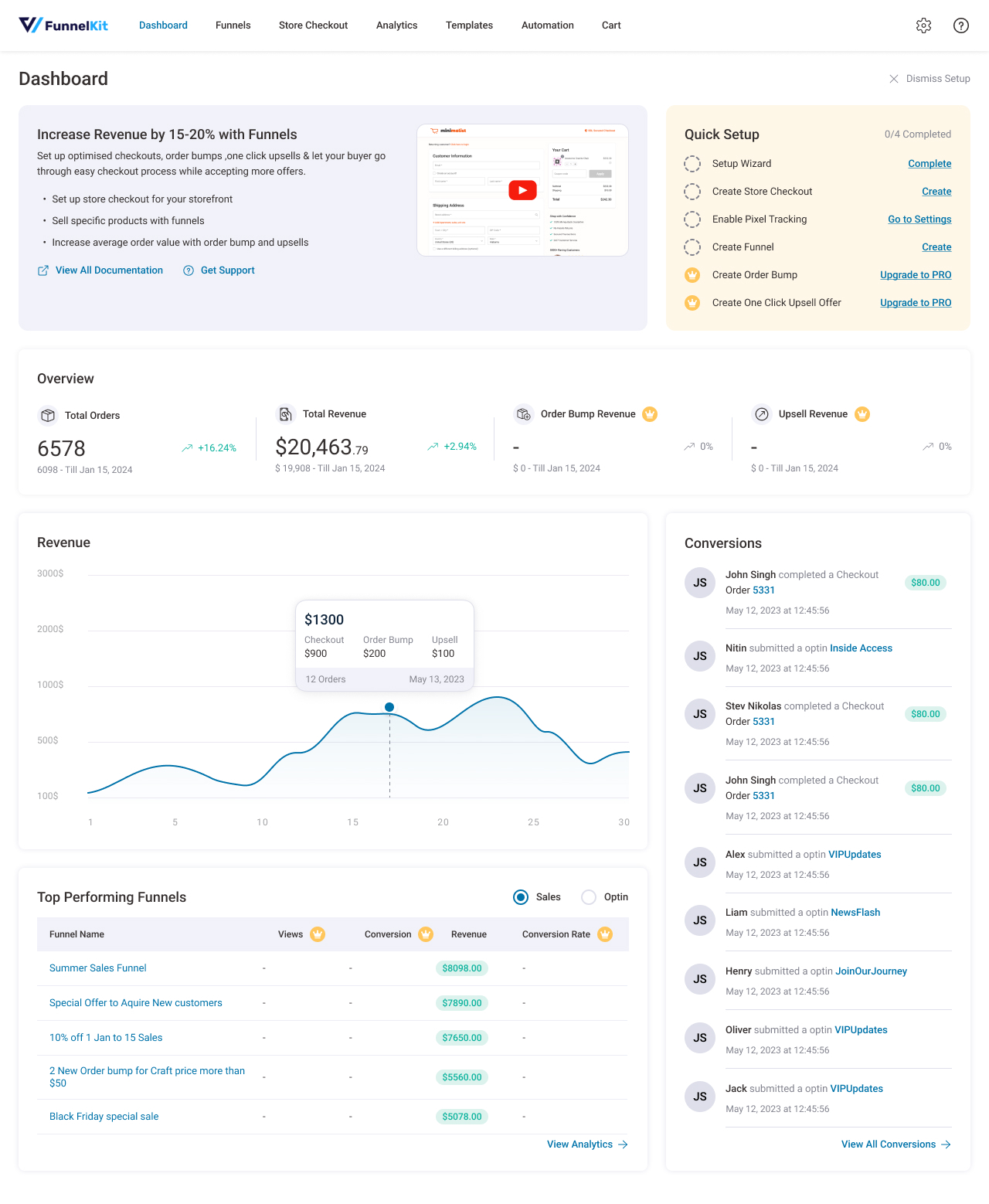
Performance Dashboard
The Performance Dashboard gives you a bird’s-eye view of all your funnels.
Here’s what you can see right inside your WordPress dashboard:
- The total number of contacts, orders, and revenue
- Revenue generated per contact
- Best-performing funnels and pages to See the leaderboard to know what’s working and what’s not
- Recent activities to see a log to track the users’ actions in real time
FUNNEL BUILDER PRO FEATURES
Conversion Optimized WooCommerce Checkout Pages
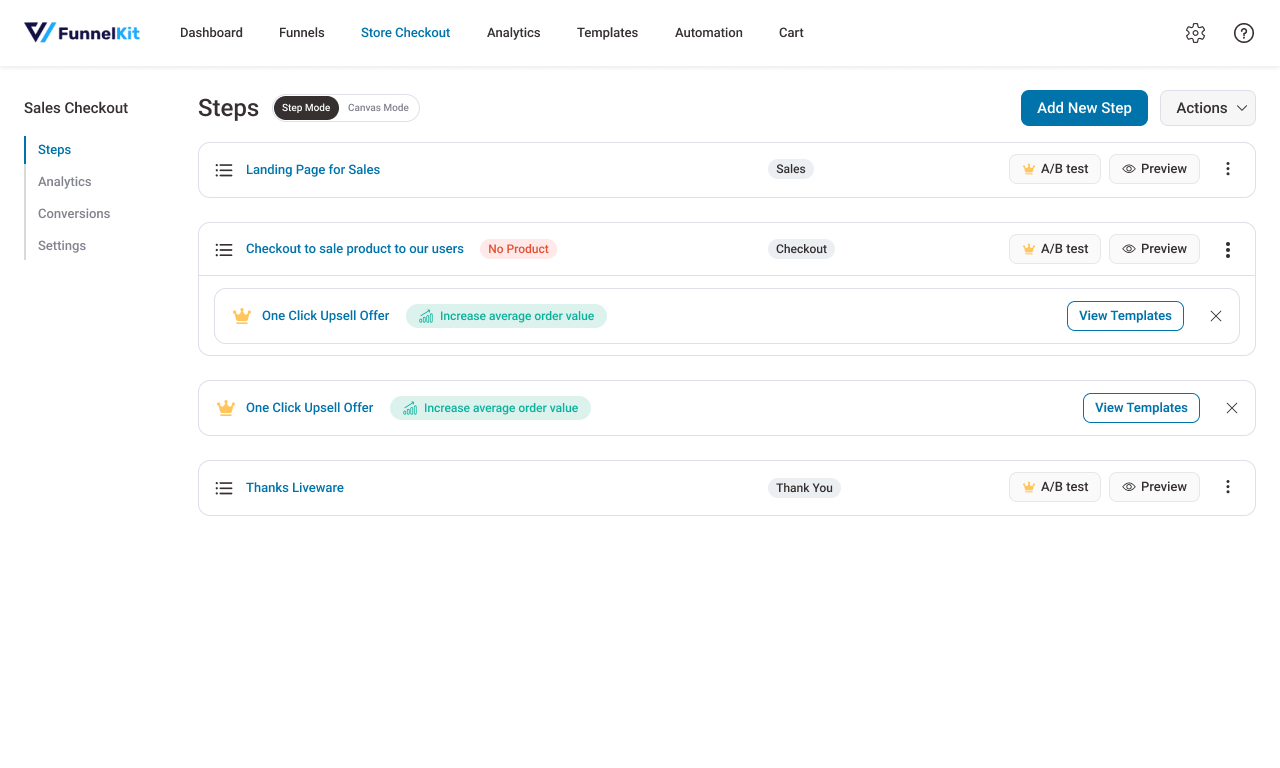
Split a long checkout form into one-, two- or three-step layouts, including a Shopify-style layout, or build a streamlined one-page checkout and dedicated order forms to sell one or several products. Apply discounts, let customers choose the exact product or variant with checkboxes or radio buttons, and build deals like buy two get one free directly at checkout.
Add entirely new fields to the checkout, choosing from 14+ field types such as text, checkbox, radio, HTML and file upload. Make fields conditional so they appear only when relevant, like a company name field for business buyers or a gift message when a gift option is chosen. Edit the order summary and mini cart shown at checkout.
Optimize your checkout with smart features like Google Address Autocomplete, auto-apply coupons, smart login, multistep field preview, and more.
Enable WooCommerce checkout optimization to reduce cart abandonment in your store.
AOV-Boosting Order Bumps
Order bumps are offers shown on the WooCommerce checkout page. Customers add them to the cart with one click.
- Rule-based order bumps to show or skip a bump based on cart items, product category, cart total, coupons used, & more.
- Multiple order bumps on one checkout, shown in a slider skin. The order total updates with each bump added.
- Different skins and display positions to match your brand.
- Compatible with WooCommerce Subscriptions and Sublium (including variable subscriptions), plus membership products.
Post-Purchase One-Click Upsells
With post-purchase upsells, secure the immediate order before pitching other offers. Users can accept them with a single click, which boosts the store’s average order value. The friction-free purchases enhance user experience after the WooCommerce checkout page.
- Rule-based upsells and downsells based on item(s) bought, payment gateway used, order total & more.
- Dynamic Offer Paths to link offers together and show the next one based on whether the previous offer was accepted.
- Smart Skip to avoid offering products the customer already bought or has in the current order.
- Multiple upsells on a single page.
- Mobile-responsive, pre-built one-click upsell templates for Elementor, Bricks, Gutenberg, and other page builders.
- Ability to separately charge a shipping fee on the upsell product.
A/B Testing
Split test any page in the funnel, or the complete funnel. Does a one-page WooCommerce checkout convert better than a multi-step one? Does a single order bump beat three? A/B testing answers both.
Divide the traffic and send it to different variations of your page to see which path converts best.
- Split test products and offers
- A/B test prices
- Compare page designs and checkout layouts
- Test order bumps and one-click upsells
- Try different headlines and sales copy
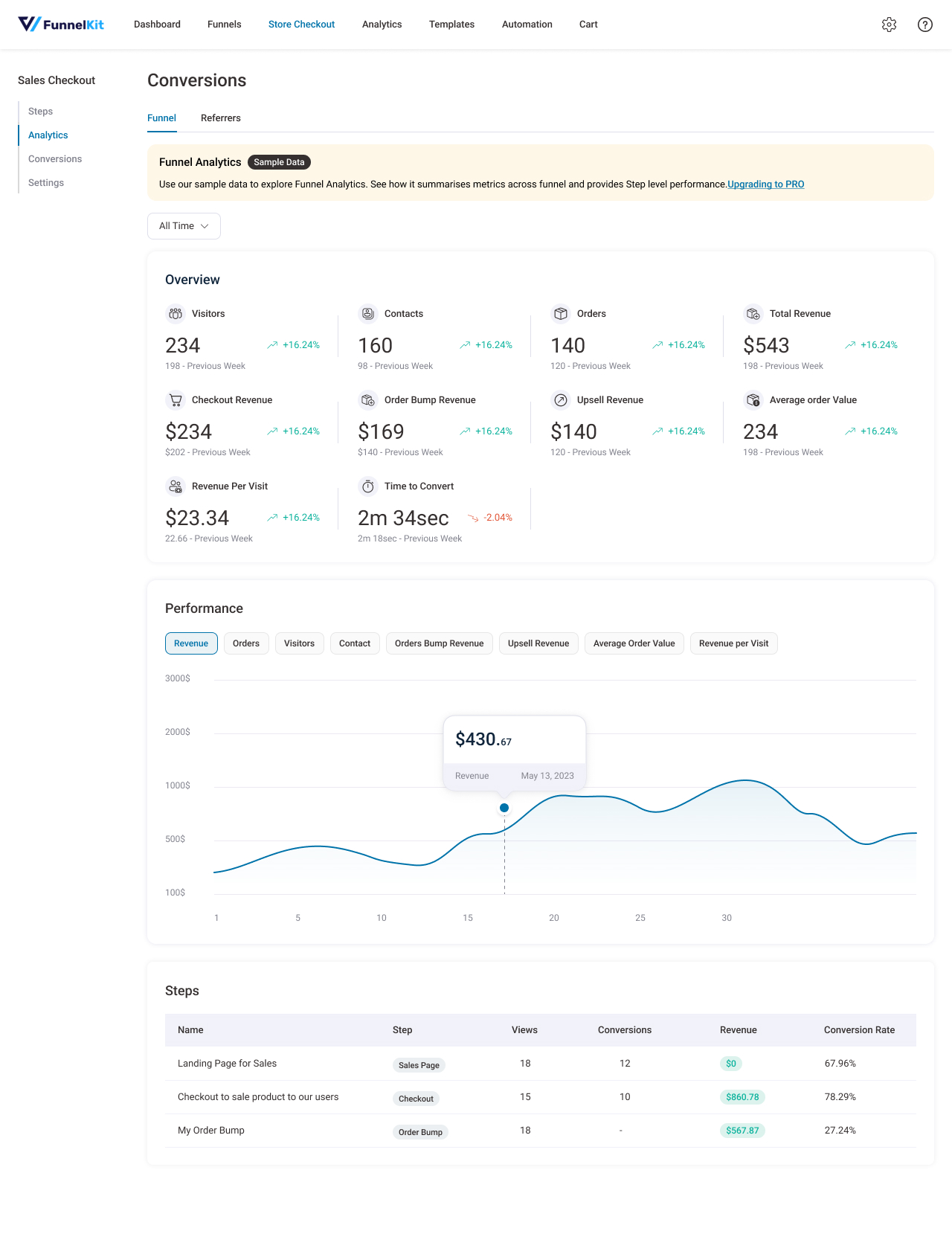
In-Depth Analytics
Visits, total revenue, revenue per visit, revenue per step and conversion rate for every funnel and every step, over any date range. See revenue generated from order bumps, one-click upsells and cart upsells.
All Premium Templates
The entire library of conversion-optimized templates, from opt-in pages to WooCommerce checkouts to thank you pages.
FunnelKit Cart Included
The Pro side cart comes free with your FunnelKit Plus license, with no separate purchase or license key. It includes in-cart upsells and cross-sells, free-shipping progress bars, milestone rewards and cart analytics.
Works With Your Stack
Themes
Works with all themes including Astra, Divi, Flatsome, WoodMart, Woostify, Shoptimizer, Enfold, Rey, and any WooCommerce-compatible theme available in WordPress.
Page Builders
Elementor, Divi, Bricks, Oxygen, Gutenberg, and Beaver Builder. Other builders like Spectra, Avada Fusion, Cornerstone, Brizy, Thrive Architect, and Greenshift work via shortcodes.
Payment Gateways
Stripe, PayPal Payments, WooPayments, Mollie, Authorize.net, Mercado Pago, and more. Apple Pay, Google Pay, and Amazon Pay are supported as express checkout options.
Plugins
WooCommerce Subscriptions, WooCommerce Product Bundles, Advanced Coupons, EU/UK VAT Manager, WPML, Polylang, TranslatePress, LearnDash, Lifter LMS, hCaptcha, Cloudflare Turnstile, and many more.
Tracking
Meta Pixel & Conversions API, Google Analytics 4, Google Ads, TikTok, Pinterest, and Snapchat.
Go Beyond Funnels With Marketing Automations
Why stop at the sale? FunnelKit Automations is free and adds:
- Abandoned cart recovery sequences
- Live cart capture for accurate abandonment tracking
- Post-purchase follow-up sequences
- Time-delayed sends scheduled around buyer behavior
- Real-time reporting on abandoned carts, recovered carts, and recovered revenue
It’s one of the most popular marketing automation and broadcast CRM plugins for WordPress, and it integrates directly with your FunnelKit checkout.
✅ Who Is FunnelKit Funnel Builder For?
FunnelKit Funnel Builder is the ideal WordPress funnel builder and WooCommerce checkout plugin for any store or business, including:
- WooCommerce store owners
- Course creators and coaches
- Membership and subscription businesses
- Software companies
- Fashion and apparel brands
- Dropshippers
- Fitness coaches
- Authors and publishers
- Personal brands and bloggers
- Real estate professionals
- Educational institutions
- Digital product sellers
🔗 Works Great With
FunnelKit Cart – A WooCommerce side cart that sends shoppers straight to your checkout, with free-shipping progress bars, milestone rewards and in-cart upsells.
FunnelKit Automations – Marketing automation and CRM for WordPress. Recover abandoned checkouts, send post-purchase follow-ups and run email/SMS broadcasts.
Sublium Subscriptions – Recurring payments, subscribe-and-save, memberships and installment billing, with failed-payment recovery plus MRR and churn analytics. Built by the FunnelKit team to work smoothly with your checkout.
FunnelKit Payment Gateway for Stripe WooCommerce – Accept cards, Apple Pay, Google Pay and buy now, pay later options through Stripe. It’s built for FunnelKit checkouts and supports one-click upsells.
FunnelKit Payment Gateway with PayPal for WooCommerce – Accept PayPal, Pay Later, Venmo and card payments using PayPal’s latest APIs, with support for subscriptions.
FunnelKit Payment Gateway for Square WooCommerce – Accept Square payments in your WooCommerce store, with a secure account connection in a few clicks.
External Services
FunnelKit may connect to the following external services, only when the related feature is used:
- FunnelKit provides the template library, template images, previews and optional usage tracking. Terms and Privacy Policy
- Google Fonts may load when a Google font is selected. Terms and Privacy Policy
- Google reCAPTCHA may be used for opt-in spam prevention. Terms and Privacy Policy
- YouTube may embed tutorial videos on FunnelKit screens. Terms and Privacy Policy
- Meta may receive pixel and Conversions API events. Terms and Privacy Policy
- Google may receive pixel and analytics events. Terms and Privacy Policy
- Pinterest may receive pixel events when a tag is added. Terms and Privacy Policy
- Snapchat may receive pixel events when a tag is added. Terms and Privacy Policy
- TikTok may receive pixel events when a tag is added. Terms and Privacy Policy
Source Code
Unminified source for the plugin’s compiled JavaScript and CSS, along with the build configuration and build steps, is available here: https://drive.google.com/drive/folders/1Z-R0_Nbb0BOCyqauxvCftjhS9Ve–IHH
Screenshots

Installation
- Install ‘Funnel Builder’ Plugin.
- Activate the Plugin.
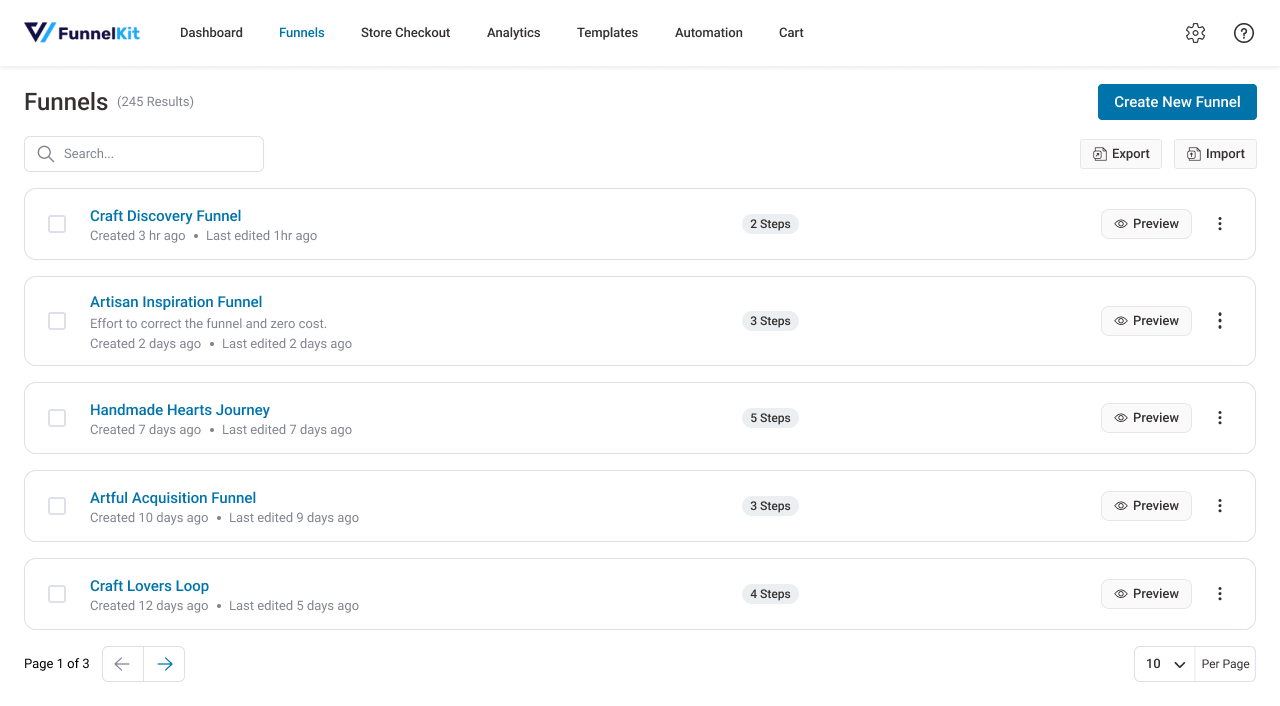
- Go to FunnelKit -> Funnels
- Start creating Funnels.
FAQ
-
What is a sales funnel?
-
A sales funnel guides a prospect from first contact to purchase. It starts with many potential customers at the top and narrows to the ones who buy. A simple funnel is a landing page, a checkout page and a thank you page, but you can add opt-ins, order bumps and upsells to turn it into a real revenue engine.
-
How can sales funnels enhance my WooCommerce store?
-
Sales funnels allow you to offer a guided path to your visitors. Instead of only having a storefront with a catalog of products, create dedicated paths for select items.
Create a beautiful store checkout with our optimized templates. Plus, add order bumps and one-click upsells to boost your average order value. You can also set up rules for your offers and target customers with offers relevant to them.
-
Why do I need a sales funnel builder?
-
Sales funnels boost sales and increase conversions for online businesses.
But creating beautiful pages requires you to spend loads of money on web developers. And most SaaS funnel builders are complicated or too expensive.The main purpose of a sales funnel builder is to help you create a high-converting sales funnel fast. It should also be affordable and easy to use.
FunnelKit’s Funnel Builder offers an affordable, robust solution.
Use FunnelKit’s Funnel Builder to create profitable sales funnels without learning code.
-
How do I choose a WooCommerce checkout plugin?
-
It depends on what you need. If you only want to hide or rename a few fields, a simple checkout field editor is enough.
If you want to replace the checkout page entirely, redesign it, restructure the fields, speed it up with Express Pay and address autocomplete, and raise order value with order bumps and upsells, you need a full checkout solution.
FunnelKit is the second kind. It’s active on 30,000+ WooCommerce stores and has 1,000+ five-star reviews on WordPress.org, many of them about our support team.
-
How do I customize the WooCommerce checkout page?
-
- Install and activate FunnelKit Funnel Builder.
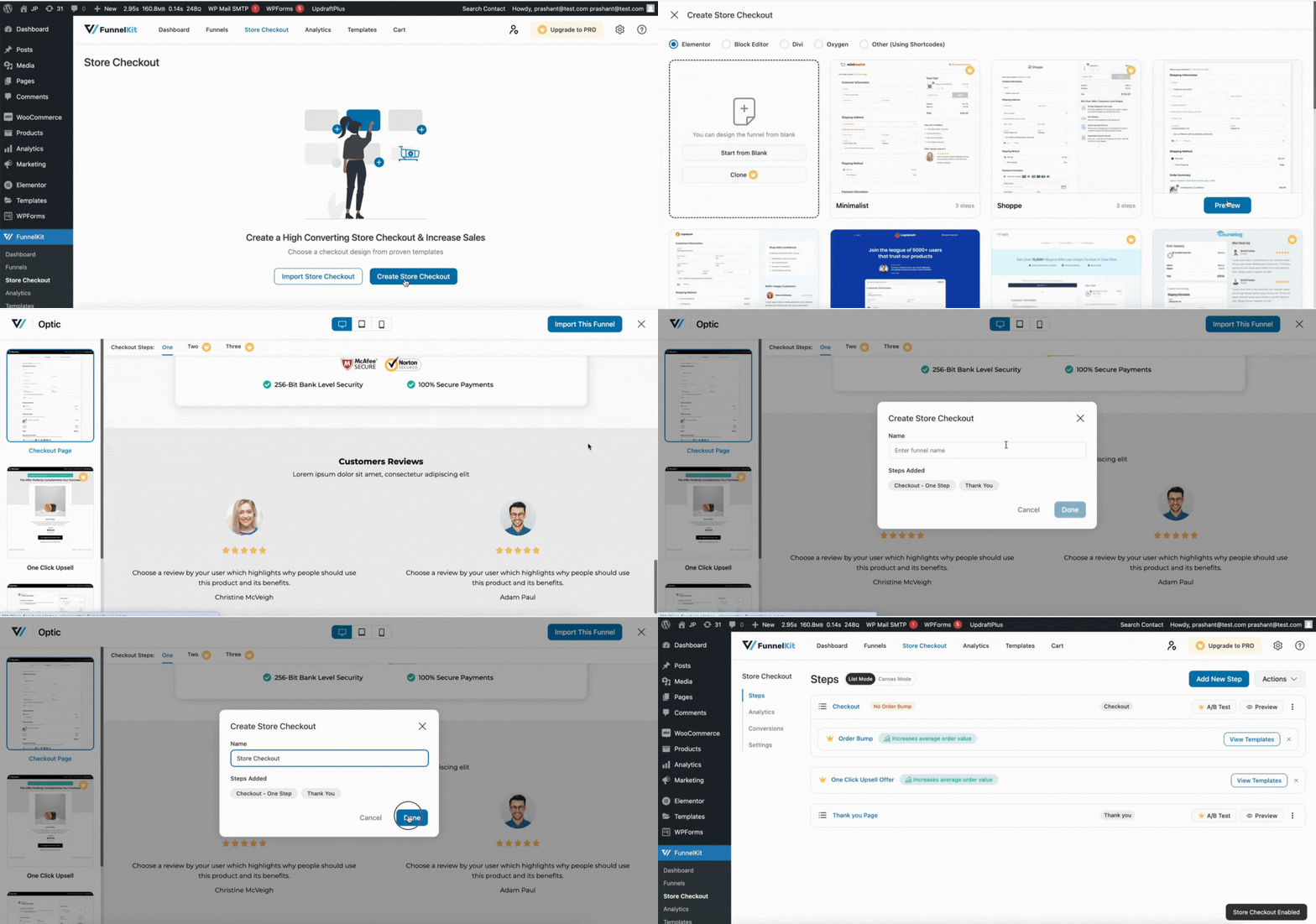
- Go to FunnelKit > Store Checkout and create a checkout.
- Import a checkout template.
- Add, remove or reorder fields in the drag-and-drop field editor.
- Choose a one-step or multi-step layout (multi-step is Pro).
- Style the page in Elementor, Divi, Bricks, Oxygen or Gutenberg, then save.
No code is required, and you don’t need to edit your theme’s template files.
-
Can I add, remove, or reorder WooCommerce checkout fields?
-
Yes. FunnelKit’s checkout field editor lets you add custom fields, delete fields you don’t need, reorder them by dragging, and create your own sections to group them. You can add text, radio, checkbox, select, and HTML fields, and set each one as required or optional.
-
Does FunnelKit Funnel Builder replace the default WooCommerce checkout page?
-
Yes. Store Checkout overrides the default WooCommerce checkout across your whole store. You can also build product-specific checkouts that apply only to certain products, while everything else uses the default flow.
-
Will this checkout plugin work with my payment gateway?
-
FunnelKit Funnel Builder works with every major WooCommerce payment gateway, including Stripe, PayPal Payments, WooPayments, Amazon Pay, Authorize.net and Mercado Pago. Express pay methods like Apple Pay and Google Pay are supported directly on the checkout page.
-
Is FunnelKit Funnel Builder a one-page checkout plugin?
-
Yes. The free version includes a one-page checkout with free templates. With Pro, you can also split the form into two- or three-step layouts and A/B test them to see which converts better for your store.
-
How is this different from a WooCommerce checkout field editor plugin?
-
A checkout field editor changes the fields. FunnelKit changes the entire checkout experience, including the page design, field structure, payment options, speed, and what you can offer the customer before and after they pay. The field editor is one feature inside it.
-
Will FunnelKit Funnel Builder slow down my checkout page?
-
No. Recent releases specifically optimized checkout performance: redundant total recalculations were removed, field rendering was made lighter, and database queries at checkout were consolidated. FunnelKit is also compatible with caching plugins.
-
Is there a free version of the checkout plugin?
-
Yes. FunnelKit Lite includes lead gen, sales funnels, customizable WooCommerce store checkout pages, the checkout field editor, thank you page templates, opt-in and sales pages, and the performance dashboard. Order bumps, one-click upsells, A/B testing, and detailed analytics are Pro features.
-
Do I need the Pro version?
-
It depends on what you’re doing. Lite is enough to customize your checkout page and build funnel pages. If you want to replace your store checkout sitewide, add order bumps or one-click upsells, or run A/B tests, you’ll need Pro. See current pricing at funnelkit.com.
-
Can I add a side cart or mini cart to my WooCommerce store?
-
Yes, with the free FunnelKit Cart plugin. It replaces the static WooCommerce cart page with a slide-out drawer that opens without a page reload, so shoppers can edit quantities and apply coupons in place, then go straight to your FunnelKit checkout. Both plugins are built by the same team and work together with no setup.
-
Will FunnelKit Funnel Builder be compatible with my WordPress theme?
-
Yes. FunnelKit Funnel Builder works with any WooCommerce-compatible theme, and we ship theme-specific compatibility fixes in most releases include compatibility fixes for popular themes like Astra, Divi, Flatsome, Woodmart, Woostify, Shoptimizer, Enfold, Rey, and many more.
-
What makes FunnelKit Funnel Builder unique as compared to other funnel builders?
-
FunnelKit is the most powerful WordPress sales funnel builder that gives you complete control over your funnels.
You don’t have to rely on other tools or plugins to create or track your funnels.
Here’s why FunnelKit Funnel Builder is one of a kind when compared to other funnel builders:
- Professionally designed templates that are customizable
- Works with all the page builders
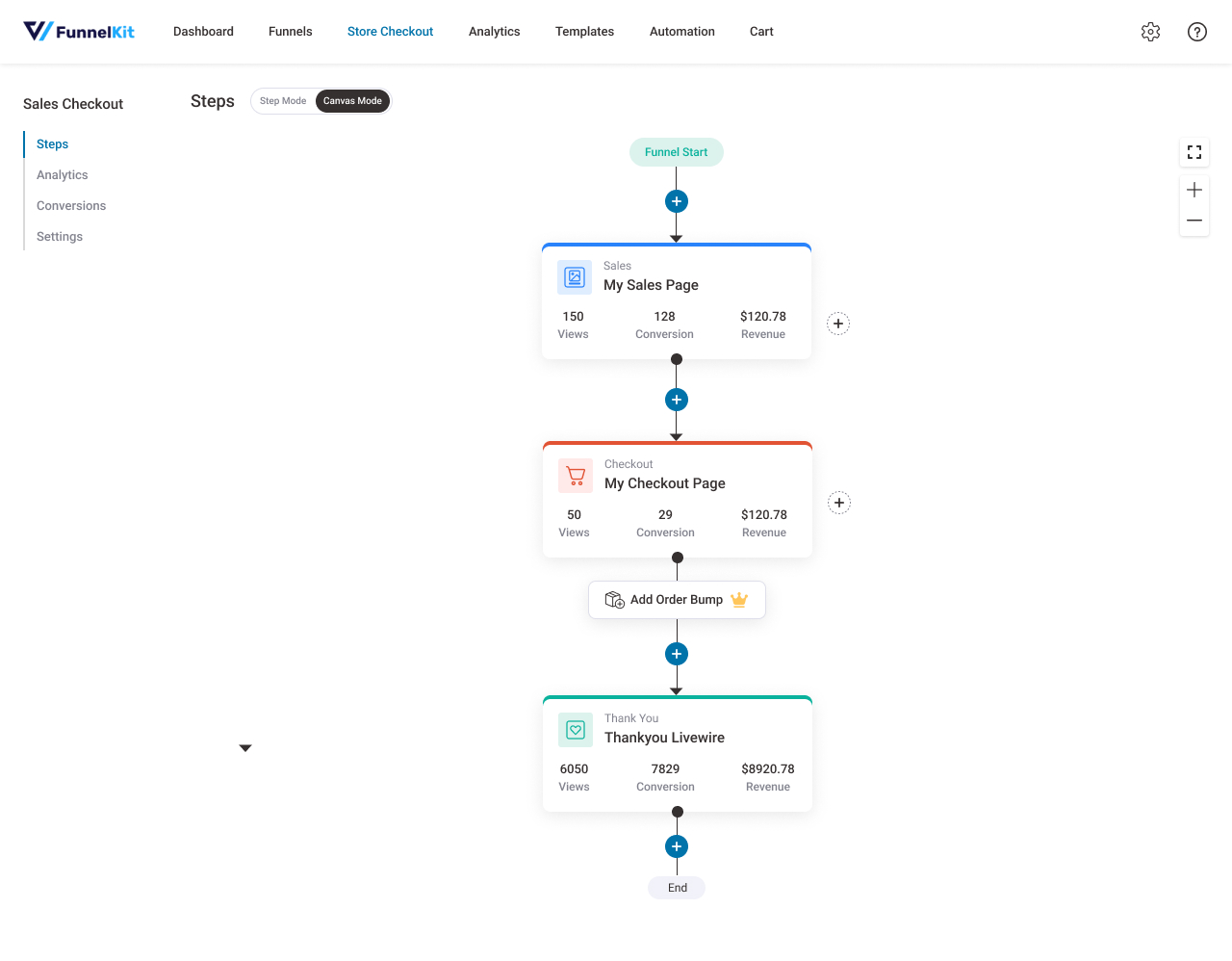
- Canvas mode to visualize your sales funnels on a single screen
- Store Checkout to replace your traditional WooCommerce checkout
- Checkout field editor and optimization options
- Order Bump offers on the checkout page
- Upsells and downsells with dynamic offer path
- Rule-based AOV boosting order bumps and one-click upsells
- Built-in A/B testing
- In-depth analytics and reporting
- Supports all the major payment processing gateways, and a lot more.
-
Will FunnelKit Funnel Builder work with the page builder I use?
-
Yes. FunnelKit integrates deeply with Elementor, Divi, Bricks, Oxygen and Gutenberg, with dedicated templates and widgets for each. Other builders like Beaver Builder, Thrive Architect and Brizy work through shortcodes.
-
Does FunnelKit work with WooCommerce Subscriptions?
-
Yes. Checkout, order bumps and one-click upsells all support subscription and membership products. For advanced subscription management, FunnelKit also works alongside Sublium.
-
Does FunnelKit works with Facebook Pixel?
-
Yes, FunnelKit work with Facebook Pixel including the Conversions API for server-side tracking. FunnelKit also supports Google Analytics 4, Google Ads, TikTok, Snapchat, and Pinterest.
-
What types of funnels can I build?
-
Lead generation, course, membership, subscription, ebook, webinar, tripwire, affiliate, masterclass, product launch, physical product, squeeze page, quiz and challenge funnels, among others. There’s no limit on how many you create.
-
Do I need any coding or design skills to set up funnels with FunnelKit?
-
No, you don’t need any coding or design skills to set up your sales funnels with FunnelKit.
With a library of templates, you can start customizing and creating your funnels fast. Create your funnels from scratch with drag-and-drop widgets using different page builders.
-
I’m new to FunnelKit. Where can I find its documentation?
-
Congratulations on starting your journey with FunnelKit. Click here to explore our official FunnelKit documentation.
-
I’m stuck. Who do I contact?
-
Reach our Support Team. We answer questions on the free version too.
Reviews


Contributors & Developers
“FunnelKit – Funnel Builder Plugin for WooCommerce Checkout” is open source software. The following people have contributed to this plugin.
Contributors

“FunnelKit – Funnel Builder Plugin for WooCommerce Checkout” has been translated into 4 locales. Thank you to the translators for their contributions.
Translate “FunnelKit – Funnel Builder Plugin for WooCommerce Checkout” into your language.
Interested in development?
Browse the code, check out the SVN repository, or subscribe to the development log by RSS.
Changelog
3.17.0
- Added: Checkout: Added an Email typo suggestion option under Checkout Optimisation to catch common email domain mistakes. (#9605)
- Added: Funnel: Added Customer Journey to Conversion Tracking with a Conversions column, details modal, Pages Visited filter and export. (#9504)
- Added: Funnel: Added attributed revenue reporting for landing page steps, including order bump and upsell revenue. (#9536)
- Added: Funnel: Added a setting to skip Meta Purchase events for subscription renewal orders. (#9336)
- Added: Checkout: Added new filters for order item thumbnails on checkout and Thank You pages, with cart item context. (#9443)
- Improved: Checkout: Checkout CSS loading optimised on a per-builder basis. (#9549)
- Improved: Checkout: Improved checkout accessibility with named mini-cart controls and labelled quantity inputs (WCAG 2.2 AA). (#9608)
- Improved: Checkout: Phone fields now render as telephone inputs with valid autocomplete for better mobile keypads and autofill. (#9625)
- Improved: Checkout: Added the Unbounded Google Font to the embed form font selector. (#9638)
- Improved: Checkout: Improved compatibility with Weight Based Shipping. (#9451)
- Improved: Checkout: Improved compatibility with WooCommerce EU VAT Number. (#9454)
- Improved: Checkout: Improved compatibility with Envia Shipping. (#9486)
- Improved: Checkout: Improved compatibility with Colombian Departments and Cities. (#9538)
- Improved: Checkout: Improved compatibility with Spectra. (#9540)
- Improved: Checkout: Improved compatibility with FiboFilters. (#9554)
- Improved: Checkout: Improved compatibility with MailerLite for WooCommerce. (#9568)
- Improved: Checkout: Improved compatibility with SDEK and eDostavka. (#9571)
- Improved: Checkout: Improved compatibility with Germanized for WooCommerce. (#9584)
- Improved: Checkout: Improved compatibility with WPLoyalty. (#9596)
- Improved: Funnel: Optimised the dashboard upsell and order bump listing for stores with many offers. (#9420)
- Improved: Funnel: Updated the Google Fonts list in block editor controls with newer families such as Lexend Deca. (#9602)
- Improved: Funnel: Improved conversion analytics now cover the UTM content column too. (#8592)
- Fixed: Checkout: Collapsible order summary now shows coupon success and error messages correctly. (#9345)
- Fixed: Funnel: Improved deduplication for duplicate Add to Cart tracking events. (#9483)
- Fixed: Checkout: Resolved unexpected zooming on iPhone Safari for block-supported themes. (#9479)
- Fixed: Checkout: Order summary now shows the correct line total for subscription products with quantity above one. (#9543)
- Fixed: Checkout: Checkout discounts now apply to products with a scheduled sale on WooCommerce 11.1.0. (#9544)
- Fixed: Checkout: The Bricks checkout breadcrumb setting is now honoured. (#9620)
- Fixed: Funnel: Meta Pixel and Conversions API events now report the actual page URL. (#9268)
- Fixed: Funnel: Meta ViewContent events now send the standard product content type. (#9576)
- Fixed: Funnel: View events for variable products now use the URL-selected variation and its price. (#9591)
- Fixed: Funnel: Child pages now redirect to their canonical URL with the parent slug. (#9603)
- Fixed: Optin: Opt-in forms now redirect to the next step correctly when the Kit (ConvertKit) integration is enabled. (#9352)
3.16.0.6
- Improved: Thank You Page: Hardened output with inline scripts on the order received page. (#9581)
3.16.0.5
- Improved: Funnel: Admin App styling improved with WordPress version 7.1. (#9442)
- Improved: Checkout: Better handling for the phone field styling conflict with 3rd party plugins printing intl-tel-input CSS. (#9465)
- Fixed: Checkout: PageView and Custom events for Facebook conversion API fixed. (#9493)
3.16.0.4
- Improved: Funnel: Compatibility with Elementor improved related to widget cache. (#9446)
3.16.0.3
- Improved: Thankyou Page: Shortcodes for order details and customer info improved to handle QR codes. (#9436)
- Fixed: Optin: Compatibility with Cloudflare Turnstile causing double validation. (#9432)
3.16.0.2
- Fixed: Checkout: Advanced phone field styling issues with divi builder. (#9418)
- Fixed: Checkout: Phone field validation not working correctly in a few edge cases. (#9414)
3.16.0.1
- Fixed: Plugin deactivation modal popup was not working. (#9405)
3.16.0
- Added: Optin: Added compatibility with Simple Cloudflare Turnstile for optin forms. (#8823)
- Improved: Checkout: Improved checkout performance by skipping redundant total recalculations action hooks. (#8717)
- Improved: Checkout: Optimized advanced field rendering with a lighter order lookup. (#8719)
- Improved: Checkout: Improved page caching behavior on dedicated checkout pages. (#8722)
- Improved: Checkout: Improved compatibility with Bricks Builder. (#8779, #8817, #8825)
- Improved: Checkout: Improved compatibility with Elementor. (#8790)
- Improved: Checkout: Improved compatibility with EU VAT Number for WooCommerce. (#8799)
- Improved: Checkout: Improved compatibility with PS Delivery Module. (#8804)
- Improved: Checkout: Improved compatibility with Germanized for WooCommerce. (#8827)
- Improved: Checkout: Improved coupon message reliability at checkout. (#8833)
- Improved: Checkout: Improved compatibility with Loco Translate. (#8841)
- Improved: Checkout: Improved compatibility with Divi. (#8846, #9063, #9240)
- Improved: Checkout: Refined the Google Pay button outline at checkout. (#8871)
- Improved: Checkout: Improved compatibility with Oxygen Builder. (#8878)
- Improved: Checkout: Improved checkout accessibility with clearer labels, ARIA attributes, and landmarks. (#8884)
- Improved: Checkout: Improved compatibility with the Block editor. (#8888)
- Improved: Checkout: Improved persistence of checkout customizations across order review updates. (#8918)
- Improved: Checkout: Improved mobile order summary display alongside theme styles. (#8922)
- Improved: Checkout: Improved compatibility with EU/UK VAT Manager for WooCommerce. (#8928, #9300, #9320)
- Improved: Checkout: Improved compatibility with WooCommerce Product Bundles. (#8931)
- Improved: Checkout: Improved compatibility with Google Captcha Pro. (#8976)
- Improved: Checkout: Improved compatibility with Amazon Pay. (#9040)
- Improved: Checkout: Refreshed the Express Checkout placement labels. (#9068)
- Improved: Checkout: Improved compatibility with Spectra. (#9102)
- Improved: Checkout: Improved compatibility with WebToffee Gift Cards. (#9118)
- Improved: Checkout: Improved compatibility with Discount Rules PRO for WooCommerce. (#9123)
- Improved: Checkout: Order summary now inherits the site’s default font. (#9137)
- Improved: Checkout: Improved compatibility with Weight Based Shipping for WooCommerce. (#9162)
- Improved: Checkout: Improved compatibility with Woostify. (#9176)
- Improved: Checkout: Improved compatibility with Sonaar MP3 Player Pro. (#9179)
- Improved: Checkout: Improved compatibility with Klaviyo. (#9191)
- Improved: Checkout: Improved compatibility with WooCommerce Checkout Field Editor. (#9201)
- Improved: Checkout: Express checkout buttons now load with consistent sizing and a smoother reveal. (#9228)
- Improved: Checkout: Improved compatibility with E-cab Taxi Booking Manager. (#9243)
- Improved: Checkout: Improved compatibility with Better Shipping Calculator for Brazil. (#9244)
- Improved: Checkout: Improved compatibility with Sublium. (#9246)
- Improved: Checkout: Improved compatibility with Astra. (#9253)
- Improved: Checkout: Improved compatibility with Shoptimizer. (#9256)
- Improved: Checkout: Improved compatibility with WP Content Copy Protection. (#9285)
- Improved: Checkout: Improved compatibility with WooCommerce Subscriptions. (#9312)
- Improved: Checkout: Improved compatibility with YayPricing. (#9324)
- Improved: Funnel: Improved compatibility with LiteSpeed Cache. (#8647)
- Improved: Funnel: Improved error reporting and recovery in the plugin diagnostics screen. (#8751)
- Improved: Funnel: Improved Conversion API event payloads for more accurate server-side tracking. (#8787)
- Improved: Funnel: Improved compatibility with B2BKing. (#8847)
- Improved: Funnel: Improved compatibility with All in One SEO. (#8984)
- Improved: Funnel: Improved dashboard widget resilience when WooCommerce helpers are unavailable. (#8987)
- Improved: Funnel: Improved admin screen styles to be compatible with WordPress 7.0. (#9014)
- Improved: Funnel: Improved visibility of the quantity value in order bump rules. (#9024)
- Improved: Funnel: Improved funnel canvas rendering and performance across browsers. (#9029)
- Improved: Funnel: Improved resilience of admin data loading against stray output from other plugins. (#9042)
- Improved: Funnel: Refined the Cart upsell settings notice so it matches its action. (#9073)
- Improved: Funnel: Sublium recommendation notice now appears later after activation. (#9077)
- Improved: Funnel: Improved license detection when the plugin folder has been renamed. (#9083)
- Improved: Funnel: Conversion API checkout event logs now include the event name. (#9095)
- Improved: Funnel: Improved the unsaved changes prompt after saving order bump designs. (#9133)
- Improved: Funnel: Improved compatibility with Avada Builder. (#9172)
- Improved: Funnel: Improved plugin architecture by separating the Lite and Pro admin app assets. (#9251)
- Improved: Funnel: Improved plugin compliance with WordPress.org plugin guidelines. (#9252)
- Improved: Funnel: Improved privacy and page performance by serving font assets locally. (#9259)
- Improved: Funnel: Funnel Session handling improved for in-app browsers. (#9247)
- Improved: Optin: Strengthened reCAPTCHA validation on optin forms to block automated submissions. (#9054)
- Improved: Optin: Improved compatibility with Elementor. (#9296)
- Improved: Thank you Page: Improved Meta Purchase event data with full product content details. (#8837)
- Improved: Thank you Page: Improved compatibility with Sensei LMS. (#9019)
- Improved: Thank you Page: Order details now honor item visibility rules set by other plugins. (#9071)
- Improved: Thank you Page: Improved compatibility with Wompi. (#9226)
- Fixed: Checkout: Emptied collapsible prefix labels now stay as saved instead of reverting to the default text. (#9030)
- Fixed: Checkout: Persistent cart now restores saved items when using a global checkout. (#9047)
- Fixed: Checkout: Phone country code now saves and shows in the summary when entered with a dial code. (#9109)
- Fixed: Checkout: Order summary strikethrough price now includes tax on stores displaying prices excluding tax. (#9113)
- Fixed: Checkout: Custom header and footer scripts saved before the sanitization update now render again. (#9224)
- Fixed: Checkout: Phone field now follows the field editor Required setting instead of the WooCommerce Customizer. (#9233)
- Fixed: Funnel: Pixel overrides from a previous funnel visit no longer apply on non-funnel pages. (#9007)
- Fixed: Funnel: Upsell offers now appear in the offers filter dropdown. (#9026)
- Fixed: Funnel: Contact tags now show every saved tag after in-app navigation instead of the first few. (#9065)
- Fixed: Funnel: Advanced filter rule chips now render readable text instead of raw template placeholders. (#9155)
- Fixed: Funnel: Explicitly allow GTM tracking scripts in script related settings . (#9220)
3.15.0.8
- Improved: Enhanced overall stability and reliability across the plugin.
- Improved: Funnel: Compatibility with divi5 related to Thankyou page CSS. (#9161)
3.15.0.7
- Fixed: Funnel: Admin UI canvas mode was not showing funnel steps.
3.15.0.6
- Improved: Compatibility with PHP version 8.4.x. (#9140)
- Improved: Funnel: Conversion analytics to handle edge cases of retrying orders with no funnel ID multiple times. (#9044)
- Improved: Funnel: Hardened the security of the plugin. (#9036)
- Fixed: Checkout: PHP warnings when store checkout template is used as subscription change-payment method page. (#8854)
3.15.0.5
- Improved: Checkout: Compatibility with MercadoPago Gateway improved. (#8783)
3.15.0.4
- Improved: Checkout: Compatibility with CookieYes plugin improved to fix the PHP warning. (#8932)
3.15.0.3
- Improved: Funnel: Compatibility with WooCommerce 10.8.0. (#8877)
- Security Fix: Hardened the security of the plugin. (#8906)
- Improved: Checkout: Express checkout buttons loading behavior improved with FK Stripe. (#8749)
3.15.0.2
- Fixed: Critical security patch for SQL queries related to views for Optin/Sales pages. (#8826)
- Fixed: Funnel: Compatibility issues with Divi5 checkout module is resolved. (#8831)
3.15.0.1
- Improved: Funnel: Compatibility with divi page builder improved to handle few edge cases. (#8813, #8809, #8815)
3.15.0
- Added: Funnel: Deep compatibility with Divi5 theme with New & improved templates. (#8310)
- Added: Funnel: Added per Product Checkout Redirect feature to allow dedicated checkout pages to open in regular store flow. (#8612)
- Added: Funnel: Added product stock status as a display condition for order bump rules. (#8628)
- Added: Funnel: Added compatibility with Etch theme for landing pages, thank you pages, and opt-in pages. (#8682)
- Improved: Checkout: Improved compatibility with WordPress 7.0 for Gutenberg blocks. (#8545)
- Improved: Checkout: Improved compatibility with PS Delivery Module. (#8576)
- Improved: Checkout: Improved compatibility with CookieYes. (#8643)
- Improved: Checkout: Improved compatibility with WooPayments. (#8650)
- Improved: Checkout: Improved compatibility with Oxygen Builder. (#8664)
- Improved: Checkout: Improved compatibility with Germanized for WooCommerce. (#8667)
- Improved: Checkout: Improved compatibility with hCaptcha. (#8685)
- Improved: Checkout: Improved compatibility with WooCommerce Subscriptions. (#8689, #8692)
- Improved: Checkout: Improved compatibility with Enfold theme. (#8696)
- Improved: Checkout: Improved compatibility with Spectra. (#8706)
- Improved: Checkout: Improved compatibility with Woostify theme. (#8709)
- Improved: Checkout: Optimized checkout module initialisation by consolidating redundant database queries. (#8728)
- Improved: Funnel: Improved compatibility with Complianz. (#8540, #8712)
- Improved: Funnel: Improved sticky header behaviour on the funnel listing screen. (#8670)
- Improved: Funnel: Improved compatibility with Elementor. (#8622)
- Added: Checkout: Added a ‘Continue Shopping’ link when the cart is empty on checkout pages. (#8632)
- Fixed: Checkout: Fixed missing CSS for the address field search icon on RTL checkout pages. (#8589)
- Fixed: Checkout: Fixed mini cart accordion becoming un-clickable due to nested element structure. (#8614)
- Fixed: Checkout: Fixed Bulgarian phone number validation accepting incomplete mobile numbers. (#8634)
- Fixed: Checkout: Resolved script dependency notice in the checkout Editor caused by a missing checkout script. (#8659)
- Fixed: Checkout: Resolved fatal error caused by WooCommerce Store API SessionHandler incompatibility. (#8680)
- Fixed: Checkout: Fixed radio button alignment in the product switcher when product images are visible. (#8701)
- Fixed: Funnel: Fixed character encoding corruption for non-Latin characters in opt-in email form submissions. (#8606)
- Fixed: Funnel: Restored missing strike-through price and total savings message controls in the checkout builder for subscription products. (#8626)
- Fixed: Funnel: Fixed sales page URL not updating correctly when the page name contains quote characters. (#8655)
- Fixed: Funnel: Fixed billing email field unable to be repositioned in the multi-step checkout builder. (#8657)
- Fixed: Thank you Page: Resolved unintended HTML stripping in order total labels on thank you pages. (#8596)
- Fixed: Funnel – Admin Pages to handle Funnel titles in non-English character languages. (#8736)
3.14.0.3
- Improved: Funnel: Enhanced plugin security for optin related SQL queries. (#8759)
3.14.0.2
- Fixed: Checkout: Compatibility with MailPoet And Order Delivery Date by Tyche plugins updated for css rendering issue.(#8640)
3.14.0.1
- Fixed: Checkout: Compatibility with Astra and Avada themes updated for css rendering issue.(#8617)
3.14.0
- Added: Checkout: Added compatibility with DPD France shipping plugin. (#8297)
- Added: Checkout: Added compatibility with WooCommerce Address Validation plugin. (#8377)
- Added: Checkout: Added filter hook to customize the return to cart link URL. (#8393)
- Added: Checkout: Added JavaScript filter hook for the add_to_cart tracking event. (#8407)
- Added: Checkout: Added compatibility with Cornerstone page builder for checkout pages. (#8449)
- Added: Checkout: Added compatibility with Greenshift by Wpsoul page builder. (#8510)
- Added: Funnel: Added filter hook to customize CAPI log event types. (#8375)
- Improved: Checkout: Improved compatibility with Mercado Pago gateway. (#8567)
- Improved: Checkout: Improved smart button loading speed for faster checkout experience. (#7985)
- Improved: Checkout: Added CSS isolation to prevent third-party plugins from overriding the Place Order button style. (#8040)
- Improved: Checkout: Improved compatibility with WooCommerce Subscriptions Gifting. (#8070)
- Improved: Checkout: Improved compatibility with MailPoet. (#8094)
- Improved: Checkout: Improved compatibility with SiteGround Optimizer. (#8311)
- Improved: Checkout: Improved compatibility with YITH Points and Rewards. (#8346)
- Improved: Checkout: Improved product display consistency and UI for the product switcher at checkout. (#8351)
- Improved: Checkout: Improved compatibility with Customer Reviews for WooCommerce in Elementor. (#8372)
- Improved: Checkout: Improved compatibility with Magic Login Pro. (#8479)
- Improved: Checkout: Improved compatibility with PS Delivery Module. (#8515)
- Improved: Checkout: Added built-in Econt Delivery address field support with improved order review fragment handling. (#8538)
- Improved: Checkout: Improved compatibility with shipping plugins that append pickup point selection buttons. (#8563)
- Improved: Checkout: Added an admin notice when multiple checkout forms are detected on a single page. (#8569)
- Improved: Checkout: Improved compatibility with Boxcar theme. (#8256)
- Improved: Checkout: Improved compatibility with Spectra. (#8260)
- Improved: Checkout: Improved compatibility with Bricks Builder. (#8295)
- Improved: Checkout: Improved compatibility with the Block editor. (#8316, #8431)
- Improved: Checkout: Improved compatibility with PayU. (#8323)
- Improved: Checkout: Improved compatibility with Extra Product Options & Add-Ons. (#8335)
- Improved: Checkout: Improved compatibility with third-party field registration plugins. (#8338)
- Improved: Checkout: Improved compatibility with WooPayments. (#8405)
- Improved: Checkout: Improved compatibility with Rey theme. (#8412)
- Improved: Checkout: Improved compatibility with Germanized for WooCommerce. (#8453, #8535)
- Improved: Checkout: Improved compatibility with Jubelio Shipment. (#8455)
- Improved: Checkout: Improved compatibility with PublicSquare Payments. (#8457)
- Improved: Checkout: Improved compatibility with FunnelKit Stripe. (#8483)
- Improved: Funnel: Enhanced Facebook Advanced Matching to include contact data for more accurate event tracking. (#7834)
- Improved: Funnel: Enhanced Pinterest event tracking with improved data formatting. (#8283)
- Improved: Funnel: Improved template import logic with container status detection. (#8345)
- Improved: Funnel: Hardened plugin security across admin and checkout modules. (#8387)
- Improved: Funnel: Resolved security issues in the checkout and thank you page modules. (#8417)
- Improved: Funnel: Improved TikTok pixel event tracking accuracy. (#8426)
- Improved: Funnel: Added payment gateway tracking support for BORICA Payments. (#8477)
- Improved: Funnel: Updated CAPI event_id parameter generation for better event deduplication. (#8496)
- Improved: Funnel: Added protection against activation of nulled plugin licenses. (#8501)
- Improved: Funnel: Improved compatibility with Bricks Builder. (#7981, #8032)
- Improved: Funnel: Improved compatibility with WPML and Polylang. (#8308, #8343)
- Improved: Funnel: Improved compatibility with ElementsKit. (#8550)
- Fixed: Checkout: Fixed step breadcrumb not displaying in Elementor builder on mobile devices. (#6398)
- Fixed: Checkout: Fixed coupon section alignment distortion across all page builder templates. (#8249)
- Fixed: Checkout: Fixed shipping number and neighborhood fields not saving correctly for new user registrations. (#8254)
- Fixed: Checkout: Handled potential fatal error when WooCommerce CartCheckoutUtils method is unavailable. (#8258)
- Fixed: Checkout: Fixed phone number tooltip display when flag icons are disabled. (#8264)
- Fixed: Checkout: Fixed phone number validation for Lebanese customers. (#8276)
- Fixed: Checkout: Fixed PHP undefined property warnings in the checkout template loader. (#8358)
- Fixed: Checkout: Fixed smart login popup not behaving correctly on email field submission. (#8360)
- Fixed: Checkout: Fixed bundle product quantity selector behavior in the mini cart at checkout. (#8446)
- Fixed: Checkout: Fixed Shipping Method field not appearing in the checkout form builder for Lite plan users. (#8460)
- Fixed: Checkout: Fixed Date of Birth field appearing in order meta when it was not added to the checkout form. (#8488)
- Fixed: Checkout: Resolved fatal error caused by invalid argument type in the checkout module. (#8499)
- Fixed: Checkout: Fixed Google address autocomplete not populating address line 2 for UK subpremise addresses. (#8504)
- Fixed: Checkout: Fixed email URL pre-fill failing when the address contains a + character. (#8520)
- Fixed: Checkout: Fixed currency symbol display in the Place Order button on RTL sites. (#8528)
- Fixed: Checkout: Updated WooCommerce text domain references for improved translation support. (#8530)
- Fixed: Checkout: Fixed inline CSS being incorrectly sanitized through wp_kses_post in the Lite checkout module. (#8543)
- Fixed: Funnel: Fixed cart analytics display issue in the contact details screen. (#7662)
- Fixed: Funnel: Fixed cart category rule options not listing when duplicate category names exist. (#8326)
- Fixed: Funnel: Fixed database upgrade script execution order on plugin updates. (#8328)
- Fixed: Funnel: Fixed HTML markup being stripped from checkbox field labels in checkout and optin forms. (#8333)
- Fixed: Funnel: Corrected typo on the automations screen in the admin dashboard. (#8349)
- Fixed: Funnel: Fixed PHP warning for undefined WP_Post_Type property across multiple funnel modules. (#8361)
- Fixed: Funnel: Fixed analytics crash when switching comparison view in funnel analytics. (#8366)
- Fixed: Funnel: Suppressed external plugin PHP notices appearing in the React admin interface. (#8394)
- Fixed: Funnel: Fixed order bump analytics not showing data when product price is $0 and A/B testing is enabled. (#8433)
- Fixed: Funnel: Fixed global checkout navigation links incorrectly redirecting within funnels. (#8440)
3.13.1.6
- Improved: Funnel: Enhanced plugin security for optin related SQL queries. (#8402)
3.13.1.5
- Fixed: Admin dashboard widget was not working correctly for WooCommerce version below 10.3.0 (#8353)
- Fixed: Admin notifications for the admin steps screen conditions fixed. (#8353)
3.13.1.4
- Improved: Checkout: Compatibility updated with Order Delivery Date for WooCommerce plugin by Tychesoftwares. (#8352)
- Improved: UX enhancements for the admin notifications. (#8342)
3.13.1.3
- Improved: Funnel: Enhanced plugin security for optin personalized shortcodes. (#8315)
- Improved: Checkout: Updated compatibility with Elementor for cache support. (#8270)
- Improved: Funnel: Enhanced product selection in admin interface to handle edge cases more reliably. (#8280)
- Fixed: Funnel: Resolved PHP error in admin interface when WooCommerce products are unavailable after funnel import. (#8305)
3.13.1.2
- Fixed: Compatibility issues with FunnelKit Automations resolved. (#8244)
3.13.1.1
- Improved: Checkout: Compatibility updated with MailerLite plugin. (#8237)
- Fixed: Checkout: Issue with oxygen templates getting overridden by checkout page if set for boxed or Canvas template. (#8235)
3.13.1
- Fixed: PHP deprecated warnings with WooCommerce v10.3.0 resolved for funnel pages. (#8231)
3.13.0
- Added: Checkout: Google Ads BeginCheckout event added. (#8159)
- Added: Checkout: Google Analytics AddShippingInfo event added. (#8159)
- Added: Checkout: Added compatibility with GLS and Nukium plugins, optimizing Google Maps API loading. (#7962)
- Added: Checkout: Added compatibility with RY Tools for WooCommerce to resolve ECPay shipping fragment update conflicts. (#8048)
- Added: Checkout: Compatibility added with TemplateMela Plugin. (#8154)
- Improved: Checkout: Improved the coupon apply button visibility for a few edge cases. (#7490,#8024)
- Improved: Checkout: Enhanced shimmer effect functionality when interacting with the mini cart quantity controls. (#7677)
- Improved: Checkout: Compatibility with updated Checkout field editor plugin by ThemeHigh. (#8078)
- Improved: Checkout: Enhanced order summary display for RTL layouts. (#8074,#8137)
- Improved: Checkout: Improved layout and responsiveness of checkout form by adjusting CSS styles. (#7952)
- Improved: Checkout: Compatibility updated with MyParcel field. (#8014)
- Improved: Checkout: Enhanced collapsible order summary image display. (#8050)
- Improved: Checkout: Enhanced select field dropdown functionality in Safari browser. (#7823)
- Improved: Checkout: Improved compatibility with Bricks 2.0. (#7885)
- Improved: Checkout: Compatibility updated with Astra theme. (#8067)
- Improved: Checkout: Compatibility updated with All in One SEO Pro. (#8085)
- Improved: Checkout: Improved compatibility with Elementor Pro. (#8087)
- Improved: Checkout: Prevent popups related to changes saved usually caused by external fields provider, eg: ACF fields. (#8088)
- Improved: Checkout: Enhanced third party billing and shipping field saving in order meta. (#8096)
- Improved: Checkout: Enhanced order summary item quantity selector alignment on mobile devices. (#8127)
- Improved: Checkout: Improved checkout form rendered HTML to avoid same ID on page console warning. (#8128)
- Improved: Checkout: Improved order total field styling. (#8132)
- Improved: Checkout: Enhanced editor preview for gutenberg editor to avoid conflicts with gateway scripts. (#8143)
- Improved: Checkout: Improved coupon application and removal process with mini cart. (#8192)
- Improved: Checkout: Enhanced delivery date plugin compatibility with Order delivery date pro Tyche. (#8215)
- Improved: Checkout: Refined styling with better transitions and display properties. (#7930)
- Improved: Checkout: Enhanced login OTP functionality styling. (#7994,#8012)
- Improved: Checkout: Enhanced compatibility with Yoast SEO by Team Yoast. (#8008)
- Improved: Checkout: Enhanced company field settings in customizer. (#8060)
- Improved: Checkout: Improved compatibility with WooCommerce MailerLite integration by handling exceptions and checking for plugin version constants. (#8108)
- Improved: Checkout: Updated compatibility with Chronopost by Adexos for FunnelKit Checkout. (#8115)
- Improved: Checkout: Increased template redirect priority for correct checkout page assignment. (#8103)
- Improved: Checkout: Added compatibility with Sezzle WooCommerce Payment. (#8148)
- Improved: Checkout: Load Gtag JS on footer instead of inline to adhere with HTML validations. (#8150)
- Improved: Checkout: Enhanced compatibility with TranslatePress by updating action hooks and adding a filter to manage template loading and order review text. (#8189)
- Improved: Checkout: Enhanced compatibility with Woodmart theme. (#7998)
- Improved: Funnel: Improved editor experience when using Block editor alongside Classic editor. (#8004)
- Improved: Funnel: Enhanced block editor styling issue with Thankyou page customer details widget. (#8019)
- Improved: Funnel: Enhanced plugin stability during updates. (#8027,#8035)
- Improved: Funnel: Enhanced compatibility with WP External Links plugin. (#8113)
- Improved: Funnel: Improved UTM referrer tracking to have source saved as referrer when not found. (#8121)
- Improved: Funnel: Improved performance notifications for different timezones. (#7861)
- Improved: Funnel: Enhanced Divi Builder compatibility related to advanced phone field flags. (#8130)
- Improved: Funnel: Improved product ID display on rules admin UI. (#8145)
- Improved: Funnel: Enhanced overall plugin performance. (#8015)
- Improved: Funnel: Improved plugin security. (#8133)
- Improved: Funnel: Enhanced compatibility with Complianz plugin for event tracking on consent. (#8118)
- Improved: Checkout: Added compatibility with Price Based Country plugin. (#8007)
- Improved: Funnel: Added compatibility with Simple Cloudflare Turnstile plugin. (#8036)
- Improved: Funnel: Added WooPayments multi-currency functionality support. (#8139)
- Improved: Funnel: Added custom meta field functionality for manual orders. (#8073)
- Improved: Funnel: Improved performance notification email for better accuracy. (#8212, #8152)
- Improved: Funnel: Fixed facebook access_token field display in funnel override settings. (#8124)
- Improved: Funnel: Updated compatibility with WOOCS Currency plugin for analytics values. (#8082)
- Improved: Funnel: Admin UI enhanced notice visibility control for custom shortcodes and pre-built options. (#8147)
- Improved: Funnel: Enhanced namespace handling in a few PHP classes to prevent conflicts. (#8160)
- Improved: Funnel: Enhanced currency and value for Facebook lead events. (#8202)
- Fixed: Checkout: Compatibility with WooPayments updated for checkbox styling. (#8168)
- Fixed: Checkout: Compatibility updated with coupon application and removal with WooCommerce Smart Coupons. (#8166)
- Fixed: Checkout: Compatibility updated with DHL Shipping plugin. (#8098)
- Fixed: Funnel: Avoid PHP warning during fields initialization. (#8038,#8045,#8062)
- Fixed: Checkout: Improved react APP behaviour when invalid ID in the URL for store checkout. (#8171)
- Fixed: Checkout: Improved asset enqueueing logic in Gutenberg checkout to ensure proper execution after ‘wfacp_after_checkout_page_found’ action. (#8076)
- Fixed: Checkout: Always display billing and shipping phone fields in FunnelKit Checkout, bypassing WooCommerce hidden settings. (#8195)
- Fixed: Checkout: Resolved an issue with the coupon input field’s background color affecting the label in the checkout module. (#8091)
3.12.0.1
- Improved: Plugin security improved for checkout block editor preview. (#8133)
- Improved: Checkout: Compatibility with flatsome theme updated for loader experience. (#8085)
- Imporved: Checkout: Compatibility with AISEO plugin updated for checkout template override. (#8057)
3.12.0
- Added: Funnels: Compatibility with Sequential Order Numbers plugin to improve order tracking and consistency. (#7602)
- Added: Checkout: Added a new setting to open the collapsible order summary by default for every page builder widget. (#7904)
- Added: Thank you Page: New setting to display additional WooCommerce content/hooks on thank you pages for improved compatibility with payment gateways and plugins. (#7831)
- Improved: Checkout: Improved preparation of state field select when a user is logged in. (#7897)
- Improved: Checkout: Enhanced compatibility with Bricks builder. (#7853)
- Improved: Checkout: Updated compatibility with Delivery Date Pro for WooCommerce. (#7858)
- Improved: Checkout: Enhanced compatibility with Checkout Field Editor Pro by Themehigh. (#7842, #7914)
- Improved: Checkout: Optimized “You Save” percentage calculation to avoid rounding errors. (#7826)
- Improved: Funnel: Optimized plugin codebase to improve memory consumption on admin interfaces. (#7818)
- Improved: Checkout: Updated compatibility with Rank Math SEO plugin. (#7836)
- Improved: Checkout: Enhanced cart icon SVG to better handle color conflicts with themes. (#7906)
- Improved: Checkout: Enhanced compatibility with WPLoyalty plugin for more seamless integration. (#7824)
- Improved: Funnel: Optimized queries for better plugin performance. (#7872, #7882)
- Improved: Checkout: Improved compatibility with Avada Fusion Builder when using Block editor. (#7902, #7908)
- Improved: Checkout: Enhanced compatibility with WooCommerce Sequential Order Numbers 3rd party add-ons. (#7602)
- Improved: Checkout: Enhanced compatibility with Innosend plugin for smoother operation. (#7931)
- Improved: Funnel: Optimized performance notifications to ensure they work with sites using different time zones. (#7943)
- Improved: Funnel: Enhanced admin tool for base table verification, especially for sites without WooCommerce installed. (#7946)
- Fixed: Checkout: Resolved design distortion of international dropdown when fewer than five countries are listed on mobile. (#7839)
- Fixed: Checkout: Removed “required” option from HTML fields to avoid validation errors. (#7851)
- Fixed: Thank You Page: Resolved subscription details showing twice on the thank you page after the last update. (#7817)
- Fixed: Funnel: Fixed distorted CSS in some block controls. (#7901)
- Fixed: Checkout: Resolved issue where inline stats in funnel steps weren’t showing correctly when there were multiple conversion sources. (#7821)
- Fixed: Checkout: Corrected revenue calculation in checkout analytics when multiple sources are present. (#7821)
- Fixed: Checkout: Resolved issue where the Date of Birth field was still showing a delete icon after being removed from sections in the field editor UI. (#7912)
- Improved: Funnel: Plugin Security improved against Local File Inclusion (LFI). (#7811)
- Improved: Funnel: Better compatibility with WooCommerce Default Image src. (#7873)
- Improved: Checkout: Compatibility with Authorize.net CIM gateway related to store checkout. (#7881)
- Fixed: Checkout: Collapsible Order summary was not updating with elementor in case of only enabled for mobile devices. (#7828)
3.11.1
- Fixed: Checkout: Checkout form fields were flickering on focus since the last update. (#7806)
- Fixed: Funnel: version check improved to ensure no errors in admin UI. (#7802)
3.11.0.2
- Improved: Funnel: Admin tool for “verify tables” improved to recover missing columns. (#7768)
- Fixed: Checkout: Compatibility with Klaviyo plugin updated for checkout fields default value. (#7790)
3.11.0.1
- Fixed: Funnel: Site Wide pixel tracking events was not working for Facebook, Google Analytics and Google Ads. (#7782)
- Fixed: Funnel: Prevent showing label ID for Google ads conversion labels in settings when empty. (#7786)
3.11.0
- Added: Funnel : A new settings feature to add conversion labels on opt-in submit and add-to-cart events for Google Ads, improving tracking and insights. (#5700)
- Added: Funnel: A new feature to download the funnel export while deleting the steps/funnel, streamlining the process. (#7525)
- Added: Checkout: Language translations for a smoother user experience after template import, making the platform more accessible globally. (#6538)
- Added: Funnels: [dev]Filters added to modify pixels and analytics IDs for sitewide tracking. (#7597)
- Improved: Funnels: Performance enhancement by merging tracking events AJAX request with funnel setup, streamlining the process for better functionality. (#7024)
- Improved: Funnels: Plugin translation for Admin reports screens to enhance accessibility and user experience. (#7104)
- Improved: Funnels: Performance optimization by fine-tuning MySQL …